💼 Available Versions: Open Source vs. Enterprise
Mercator is available in two editions to meet the needs of all organizations: Open Source and Enterprise.
The Enterprise edition includes two advanced features not available in the Open Source version.
🎨 Business Process Modeling with BPMN 2.0
The Enterprise version allows you to visually model your business processes using BPMN (Business Process Model and Notation) 2.0, the international standard for process modeling.
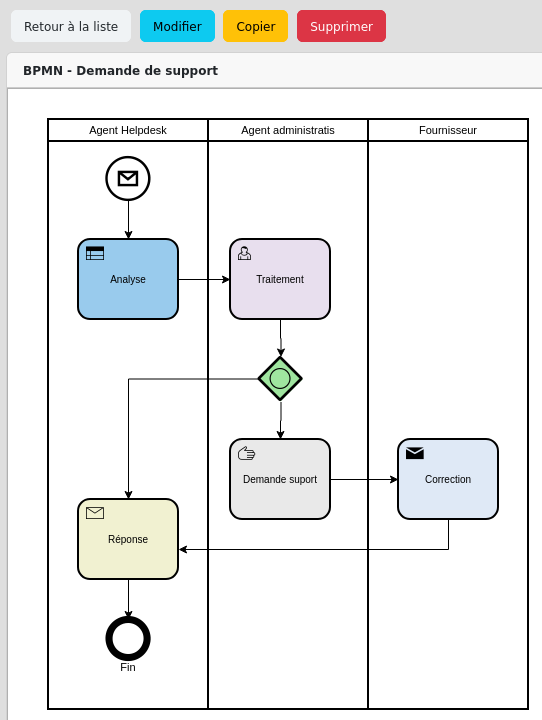
Capabilities:
- Creation of interactive process diagrams
- Representation of tasks, operations, and business activities
- Modeling of events, branches, and connectors
- Logical groupings and workflow steps
- Export of diagrams in standard formats
- Integration with existing mapping objects
Advantages:
- Clear overview End-to-end processes
- Standardized workflow documentation
- Identification of optimization points
- Easier communication with business teams
- Alignment with international standards (BPMN 2.0)
👥 Granular mapper management
The Enterprise version offers an advanced access management system that allows you to precisely define who can map what within your organization.
Features:
- Definition of custom “mapper” roles
- Assignment of granular permissions by object type
- Delegation of mapping by domain (network, applications, infrastructure, etc.)
- Management of areas of responsibility
- Traceability of changes per mapper
- Multi-level validation workflows
Use Cases:
- Network Team: Right to map only network equipment and VLANs
- Application Team: Limited access to applications and application flows
- Security Team: Read-only overview for risk analysis
- Business Managers: Mapping of processes within their scope only
Benefits:
- Effective collaboration between teams without the risk of cross-modification
- Compliance with the principle of least privilege
- Clear allocation of documentation responsibilities
- Compliance with audit requirements (who does what)
- Scalability for large, multi-site organizations
This feature is essential for Complex organizations where mapping needs to be distributed across multiple teams while maintaining overall consistency.
Edition Comparison
| Features | Open Source | Enterprise |
|---|---|---|
| Installation | ✅ Auto-Installation | ✅ Guided Installation |
| Documentation | ✅ Public Documentation | ✅ Extended Documentation |
| Updates | ✅ Public Access | ✅ Priority Access |
| 🎨 BPMN 2.0 Modeling | ❌ Not available | ✅ Exclusive Enterprise |
| 👥 Cartographer management | ❌ Not available | ✅ Exclusive Enterprise |
| Professional support | ❌ Not included | ✅ Ticket management |
| Guaranteed response time | ❌ Best effort | ✅ SLA Contractual |
| Support | ❌ Not included | ✅ Deployment support |
| Custom development | ❌ Not included | ✅ Specific features |
| Fixes | ❌ Not guaranteed | ✅ Hotfixes under SLA |
| Price | Free | See pricing → |
🎯 Which version should you choose?
Choose Open Source if:
✅ You have in-house technical expertise
✅ You can manage the installation and maintenance yourself
✅ Community support suits you
✅ You don’t have SLA requirements
✅ You want complete control over your environment
Example: SME with 100 employees and a motivated IT manager.
Choose Enterprise if:
✅ You need contractual guarantees
✅ Your business requires high availability
✅ You are subject to regulatory requirements
✅ You want personalized support
✅ You need custom development
✅ You want to model your business processes using BPMN 2.0
✅ You need granular permission management per team
Example: Critical Entity (NIS2), a large, multi-site company requiring distributed mapping across network, application, and security teams.
📞 Contact
Questions about the license? Open an issue on GitHub or contact the team via Sourcentis
Interested in the Enterprise version? View pricing and SLA →