Mercator — Know, understand and master your IT system
As cyberattacks grow in frequency and sophistication, as NIS2 imposes new obligations on essential and important entities, and as the attack surface of organizations keeps expanding, mapping your information system is no longer optional. It is the indispensable starting point of any effective security strategy.
Mercator is an Open Source IT mapping tool, born from real-world experience and aligned with ANSSI recommendations. It is designed for CISOs, IT managers and technical teams who want to regain control of their information system with a pragmatic, accessible and proven solution — with no major software investment.

Why Mercator?
Many mapping tools are too complex, too expensive or too rigid for rapid adoption. Mercator was born from the field, for the field.
📊 ANSSI-compliant
Aligned with the ANSSI mapping guide. Automatic maturity scoring, gap identification, reports ready for audits.🔓 100% Open Source
GPL licence. Open, transparent, customizable source code. No hidden modules, no barrier to adoption.🚀 Easy to deploy
Up and running in minutes via Docker or a detailed installation guide. Fast onboarding for technical teams.🤝 Active community
500+ GitHub stars, international contributors, active forum. Awarded Best Open Source Project OW2 2024.Seven views for a complete mapping — from supplier contracts to the server room
Mercator organizes your IT mapping into seven complementary views, covering the entire scope — from contractual relationships to physical equipment.
GDPR view — The processing register and your security measures.
Ecosystem view — Suppliers, partners, subcontractors and the contractual relationships that bind you to them.
Information system view — Your processes, activities, actors and the information they handle.
Administration view — Directories, zones and administrators.
Application view — All your software, grouped into application blocks, with their databases and services.
Logical infrastructure view — Networks, VLANs, firewalls, security zones, data flows.
Physical infrastructure view — Servers, racks, rooms, sites.
Impact analysis and interactive exploration
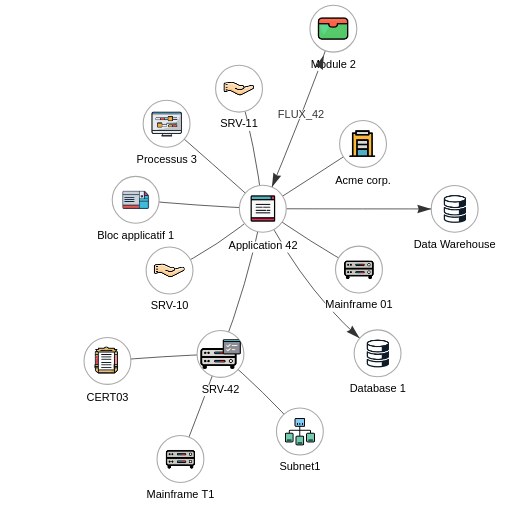
Click on any object in the mapping to instantly visualize its upstream and downstream dependencies. From an application, trace back to the servers hosting it, the databases it uses, and the business processes it supports — or follow the path in reverse.
This navigation transforms static documentation into a living map of your infrastructure.
Mercator enables you to detect SPOFs (single points of failure) before they become incidents, analyze the impact of an outage or change before it happens, visualize dependency chains across multiple levels, and plan business continuity with reliable, up-to-date data.
Compliance and maturity
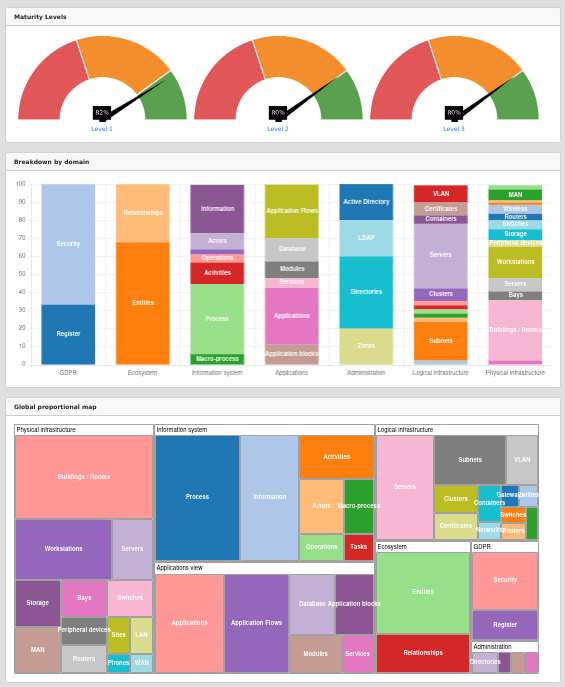
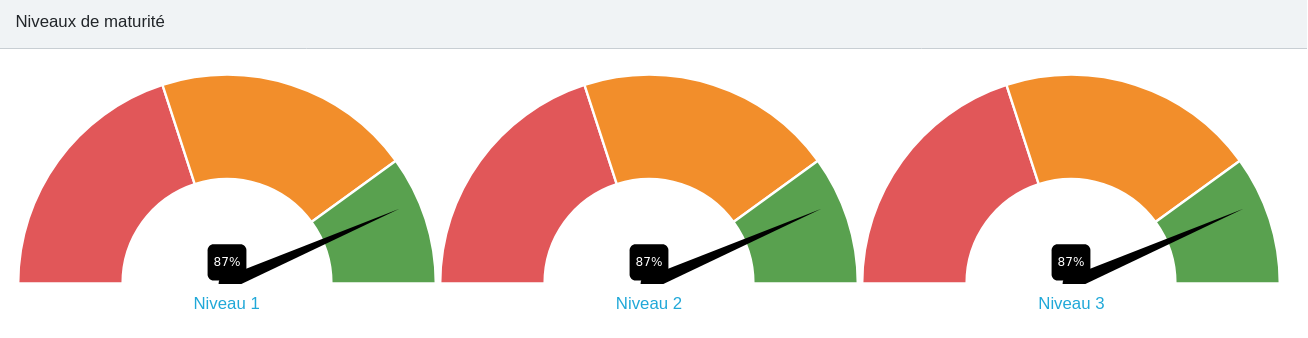
Mercator calculates a maturity score for your mapping based on the completeness and quality of the information entered. You get a clear view of your gaps by domain (governance, protection, defence, resilience), with a prioritized list of improvement actions.
The generated reports are directly usable for your audits, management reviews and regulatory submissions (NIS2, ISO 27001, HDS).
BPMN 2.0 — Bridging business and infrastructure
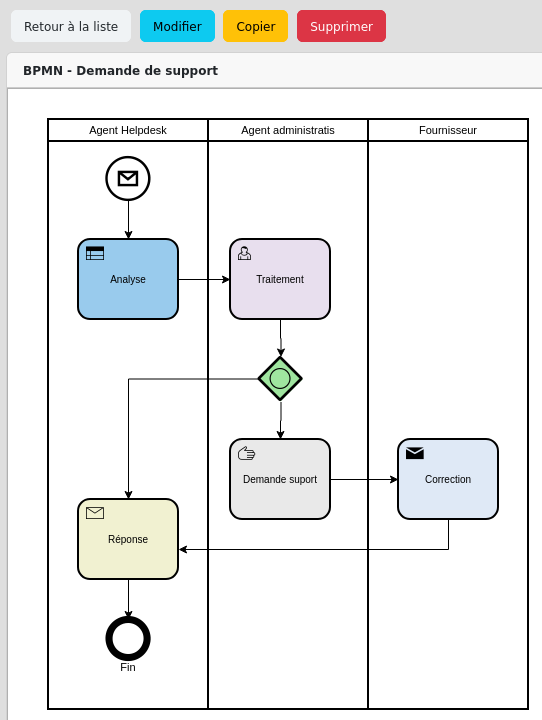
Mercator includes a BPMN 2.0 editor to model your business processes and connect them directly to your technical infrastructure.
In practice, this lets you answer critical questions in seconds: Which business processes are affected if this server goes down? Which applications support this regulatory process? Which technical flows underpin this essential service?
It is the missing link between IT teams and management, and between technical mapping and NIS2 compliance requirements.
REST API and integrations
Mercator exposes a full REST API, documented in OpenAPI/Swagger, to integrate natively into your existing IT ecosystem. Every mapping object — applications, servers, flows, processes — can be read, created and updated via the API, with secure authentication and fine-grained access control.
The API enables a living mapping, continuously fed by your tools: bidirectional synchronization with your CMDB (ServiceNow, GLPI…), automatic import from Active Directory, VMware or Kubernetes, export to your GRC or risk management platforms.
It also allows you to integrate Mercator into your CI/CD pipelines to update the mapping on every deployment, or to build custom connectors to your business tools. An interactive OpenAPI reference is available directly from the interface.

Reports and dashboards

Dynamic dashboards provide a synthetic view of your IT landscape: asset distribution, documentation rate, compliance indicators, infrastructure trends.
Mercator also generates professional reports exportable in PDF, Excel and CSV: asset inventory, supplier analysis, application mapping, compliance status. Ready for your audits and management committees.
They use Mercator







Mercator is deployed in hospitals, engineering schools, research centers, public administrations and private companies — in France and in more than 30 countries.
What users say
“Congratulations on this accessible tool that finally allows us to move forward on our mapping work.”
— IT Manager, ISO 27001-certified hospital
“Deploying Mercator was a real time-saver for our team. The built-in ANSSI recommendations are a major asset.”
— CISO of a leading French engineering school
“Thank you again for Mercator, which continues to be a reference tool in our company!”
— CTO, e-commerce company
Community recognition

🏆 Best Open Source Project OW2 2024
Mercator was awarded Best Open Source Project 2024 by the OW2 community, recognizing its code quality, documentation depth, community momentum and real-world impact in cybersecurity.
500+ ⭐ GitHub · 72 forks · 30+ countries
Conference presentations
Mercator has been presented at major security and Open Source conferences: 🎥 Voxxed Days 2025, 🎥 Hack.lu 2024, 🎥 SSTIC 2023, 📰 Linux Pratique n°146.
Open Source and professional support
Mercator is entirely free
All of Mercator's features are freely available under the GPL license. There are no hidden modules, no functional limitations, and no artificial intelligence. Community support is provided via GitHub Issues and Discussions.
Professional support contract
For organizations that need contractual guarantees, Sourcentis offers an annual support contract. It includes a guaranteed response time (4h to 48h depending on criticality), email support with a dedicated contact, hotfix delivery within 5 business days, assisted installation and onboarding, and access to the advanced knowledge base.
Ideal for: healthcare organizations, NIS2 essential entities, large organizations, and any context where tool availability is critical and a contractual SLA is required.
Get started with Mercator
Quick installation — Follow the installation guide on GitHub or deploy in minutes with Docker.
Full documentation — Everything is available at sourcentis.github.io/mercator: configuration, API reference, feature guides.
Join the community — Ask questions, share feedback and contribute on GitHub Discussions.